inPhoto Capture SLR Requirements

0


inPhoto Capture SLR is the camera control application that allows the Canon SLR (reflex) digital camera functions being controlled from PC.


Main features

Remote shooting

  • inPhoto Capture SLR controls camera shutter and release remotely and captures snapshots to your PC;

Live preview

  • allows selecting the best view before shooting, controlling picture quality, and verifying current shooting settings in run-time on big resolution. Live preview for SLR cameras is fast and have perfect quality;

TWAIN image capture

  • allows transfer acquired images via TWAIN protocol directly to necessary applications – Adobe Photoshop, Google Picasa, XnView, and any other that support TWAIN protocol, including your own application;

Save to file

  • allows you to save acquired images to file and set desired file name and folder automatically or manually;

Focus mode full control

  • nPhoto Capture SLR supports Canon SLR cameras mode that allows focusing on the object automatically with no need to turn the camera lens by hands. Different camera autofocus modes are supported. Manual focus setting is also available remotely, you may choose focus zone directly on live preview;

Image rotation

  • both live preview and snapshots can be rotated manually by 90 degrees;

Remote control of camera settings

  • Exposure settings (Aperture, Shutter, Exposure Compensation);
  • Shooting mode (Sensitivity, White Balance Mode, Flash Mode);
  • Captured image settings (Compression, Resolution);

Benefits

  • Intuitive, straightforward, and user friendly interface.
    • inPhoto Capture SLR camera control software is easy to learn and use.
    • All the controls you need to capture images are located on the single screen.
  • Familiar functions you have used working with a camera.
    • inPhoto Capture SLR has the same names of the functions of Canon SLR Camera. You will have to spend no time learning how to use remote control of your camera via inPhoto Capture SLR application.
  • TWAIN interface support extends your other applications to work with your Canon SLR camera.
    • With the inPhoto  Capture SLR TWAIN driver all the supported Canon SLR cameras are directly controlled from all the TWAIN compatible applications.
    • The images are captured directly to the third-party applications without a need to save intermediate file or to use the clipboard.
    • Batch photo processing, identification card preparation, and facial recognition operations now become much easier and more productive with the inPhoto Capture SLR TWAIN driver.
  • Fast software operation.
    • Capturing an image to TWAIN compatible application or to a file on disk takes a few seconds (capturing speed depends on the selected image resolution and camera model);
  • Reliable, professional, and on-time technical support.
  • Stable, extensively tested, and continuously improved product.

Software requirements

Supported operating systems:

  • Windows 8;
  • Windows 7;
  • Windows Vista;
  • Windows XP;
  • 32/64-bit version support;

.NET Framework 3.5

Supported cameras:
IDphotocapture PS application best used with the following Canon PowerShot compact digital camera models:

  • Canon EOS Rebel T5, EOS 1200D, EOS Kiss X70
  • Canon EOS Rebel SL1, EOS 100D, EOS Kiss X7
  • Canon EOS Rebel T5i, EOS 700D, EOS Kiss X7i
  • Canon EOS Rebel T3, EOS 1100D, EOS Kiss X50
  • Canon EOS Rebel XS, EOS 1000D, EOS Kiss F
  • Canon EOS Rebel Xsi, EOS 450D, EOS Kiss X2
  • Canon EOS Rebel T1i, EOS 500D, EOS Kiss X3
  • Canon EOS Rebel T2i, EOS 550D, EOS Kiss X4
  • Canon EOS Rebel T3i, EOS 600D, EOS Kiss X5
  • Canon EOS Rebel T4i, EOS 650D, EOS Kiss X6i

inPhoto Capture SLR also supports the following Canon SLR camera models:

  • Canon EOS 60D
  • Canon EOS 50D Digital
  • Canon EOS 40D
  • Canon EOS 5D Mark II
  • Canon EOS EOS 7D Digital
  • Canon EOS-1D Mark III
  • Canon EOS-1Ds Mark III
  • Canon EOS-1D Mark IV

It’s not necessary to have SD-card in camera to work with inPhoto Capture SLR, remote control and capture operations can be performed without card.
inPhoto Capture PS Requirements

0

Software requirements

Supported operating systems:

  • Windows 8
  • Windows 7
  • Windows Vista
  • Windows XP
  • 32/64-bit version support

.NET Framework 3.5

Supported cameras

inPhoto Capture PS application best used with the following Canon PowerShot compact digital camera models:

  • Canon Powershot ELPH 135/IXUS 145
  • Canon Powershot G15
  • Canon Powershot SX510 HS
  • Canon Powershot SX170 IS
  • Canon Powershot A1400
  • Canon Powershot SX500 IS
  • Canon Powershot SX160 IS
  • Canon Powershot A4000 IS
  • Canon Powershot A810
  • Canon Powershot SX40 HS
  • Canon Powershot A2200
  • Canon Powershot SX150 IS
  • Canon Powershot A800
  • Canon Powershot A495
  • Canon Powershot SX130 IS
  • Canon Powershot SX210 IS
  • Canon Powershot A480
  • Canon Powershot SX200 IS

inPhoto Capture PS requires special prepared SD-card to be use in camera. Requirements for SD-card:

  • SD or SDHC, any type supported by camera model
  • size from 64Mb up to 32GB

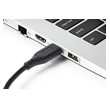
Preparation of SD-card requires flash-card reader, that supports desired SD-card.

About product
Requirements
Download
Buy now
Activation
Support

HOME

0
camera remote control

Camera remote control and
ID processing software

Camera remote control is widely used for studio photography, light-box shooting, microscopy, shooting of hard-to-access places, etc. Development of modern security systems and identification technologies made remote shooting the most popular in Identification photography.

We integrated camera remote control with full suite of utilities to create images meet any standards and requirements. So, we provide automated business solutions for any photo tasks. Our key specialization is photos for identification documents.

Fastest Way To
Quality Image Capture

Camera_remote_control

Camera remote control

Control the camera from inPhoto, see a live preview on the computer screen, save the camera settings for each type of ID image.

Full_process_automation

Full process automation

Capture and process images by one click – increase the efficiency of ID creation, streamline your business, remove unnecessary delays.

ID_Image_processing

ID Image processing

Create ID photos meet any specifications, no matter the quality required or constraints of your working environment.

TWAIN_image

TWAIN image

Transfer images directly to other software that support TWAIN protocol, all without the need for intermediate files.

quality_image_capture

unique solutions

Unique solutions for
your image tasks

Our software products is a business solution: save time and effort and improve your staff performance and productivity. It’s a powerful and affordable tool with excellent performance that helps move your work or business to the next level.

We have designed camera and image solutions since 2005 year. The unique expertise and knowledge we have accumulated during that time allow us to create for you elegant and powerful tools.

Today, our products are used by thousands of customers worldwide.

puzzle_01

Powerful Tools
Your wide opportunities

puzzle_02

Large Experience
Since 2005

puzzle_03

Effective support
We are ready to help

Our Products


IDPhoto_Processor


IDPhoto Processor

Batch ID processing of image
files from disk, TWAIN


IDPhoto Remove Background

AI-powered command line
background removal tool

inPhoto_ID_SLR


inPhoto ID SLR

SLR (EOS®) camera simplified
control, ID processing, TWAIN

inPhoto_Capture_SLR


inPhoto Capture SLR

SLR (EOS®) camera full featured
control, ID and object processing,
TWAIN, extra features


inPhoto ID Webcam

Webcam control, ID
processing, TWAIN


inPhoto Capture Webcam

Webcam control, ID
processing, TWAIN, extra features

inPhoto_ID_PS


inPhoto ID PS

Compact digital camera
(PowerShot®) simplified control,
ID processing, TWAIN

inPhoto_Capture_PS


inPhoto Capture PS

Compact digital camera (PowerShot®)
full featured control, ID and object
processing, TWAIN, extra features